Lifeform: A Bold, Organic Display Font for Modern Design
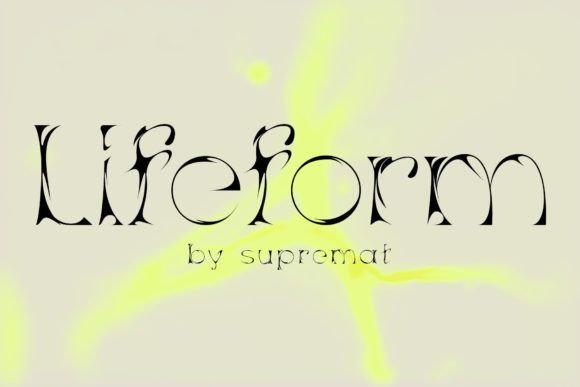
If you're looking for a font that stands out and captures attention, Lifeform might be the perfect choice. This modern display font was created through experimentation with letterforms, resulting in a design that blends organic curves with sharp, clean lines. Its unique aesthetic makes it ideal for headlines, posters, and cover designs where visual impact is key.
Lifeform isn't just another font—it's a statement. Its contrasting shapes and unconventional structure can make your text feel alive, as if it's breathing or moving. But like any powerful tool, it requires thoughtful use to achieve the best results.
Why People Choose Lifeform
Designers and creatives often turn to Lifeform when they need a font that breaks the mold. It’s not meant for body text, but for large-scale applications where the font’s personality can shine. Its organic feel can evoke a sense of movement or fluidity, making it a great fit for branding, editorial work, or digital art.
Many users are drawn to its ability to catch the eye. In a world saturated with standard fonts, Lifeform offers something different. It can help a project stand out, especially in competitive environments like advertising or social media.
Mistakes to Avoid When Using Lifeform
While Lifeform is visually striking, it's not without its challenges. One common mistake is using it in small sizes or long paragraphs. The intricate details can become difficult to read, leading to poor legibility and a negative user experience.
Another issue is overusing the font. Some designers apply it to multiple elements in a single design, which can create visual clutter. Lifeform works best as a focal point, not as a background or secondary element.
There’s also a tendency to overlook how the font interacts with other design elements. For example, pairing Lifeform with a minimalist typeface might not always produce the desired effect. It's important to consider contrast, spacing, and overall harmony in the layout.
How to Use Lifeform Effectively
To get the most out of Lifeform, start by using it in larger sizes where its details can be appreciated. Headlines, titles, and logos are excellent places to showcase its character. Keep the surrounding text simple and readable to maintain balance.
Consider the context of your design. If you're creating a poster for an art exhibition, Lifeform could add a sense of creativity and energy. But if you're designing a business report, it might be too distracting. Always align the font’s personality with the message you want to convey.
Testing is essential. Before finalizing a design, preview Lifeform in different sizes and backgrounds. Ensure it remains clear and impactful across various platforms and devices.
What to Check Before Using Lifeform
Before downloading or purchasing Lifeform, check the licensing terms. Make sure it’s suitable for your intended use, whether personal, commercial, or for a specific platform. Some fonts have restrictions on usage that can affect your project.
Also, verify that the font is available in the right format. Lifeform may come in different file types, such as OTF or TTF, and compatibility with your design software matters. Confirm that it works seamlessly with your preferred tools.
Finally, explore variations of the font. Some typefaces offer weights or styles that can expand your creative options. Lifeform might have bold, light, or alternate versions that can enhance your design without compromising readability.
Common Misconceptions About Lifeform
A frequent misunderstanding is that Lifeform is only for artistic or experimental projects. While it excels in those areas, it can also be used in more traditional contexts if applied correctly. For instance, a magazine cover or a book title can benefit from its distinctive look without appearing out of place.
Some users believe that using Lifeform automatically makes their design more professional. That’s not necessarily true. The font’s effectiveness depends on how it’s integrated into the overall design. Poorly executed layouts can undermine even the most unique typeface.
Another misconception is that Lifeform is too difficult to work with. In reality, it’s designed to be versatile. With proper spacing and typography, it can blend well with other fonts and elements. The key is to understand its strengths and limitations.
Alternatives to Consider
If Lifeform doesn’t quite fit your needs, there are other fonts that offer similar organic or modern styles. Fonts like Bebas Neue, Playfair Display, or Raleway provide different aesthetics while maintaining readability. Compare them based on your project’s goals and audience.
Don’t assume that a more popular font will always be better. Sometimes a less common typeface like Lifeform can make your work more memorable. However, it’s important to evaluate all options carefully before making a decision.
Final Thoughts on Lifeform
Lifeform is a powerful tool for designers who want to create something unique. Its combination of curves and sharp lines gives it an organic, dynamic feel that can elevate any project. However, it’s not a one-size-fits-all solution.
By understanding its strengths and limitations, you can use Lifeform effectively without falling into common pitfalls. Whether you’re a beginner or an experienced designer, taking the time to learn about this font can lead to more impactful and visually engaging work.
Remember, the goal is not just to use a cool font, but to communicate your message clearly and creatively. Lifeform can help you do that—but only if you use it wisely.